

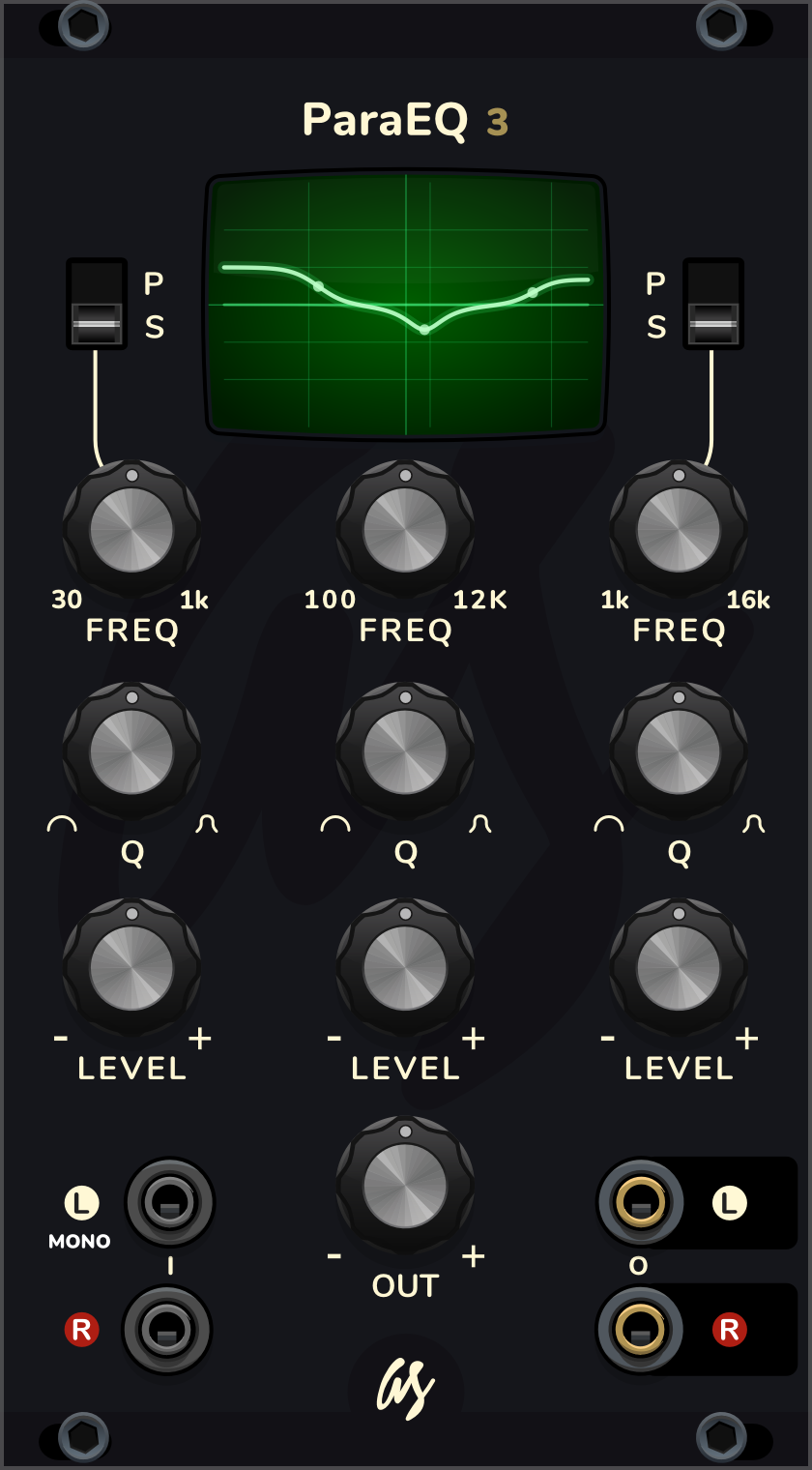
3-band stereo parametric equalizer with shelf/peak low and high bands and a response display
2.1.0
Author: Alfredo Santamaria
License: See EULA
Last updated:
Created:
Plugin: AS Drums n Filters
3-Band Parametric EQ is a stereo equalizer with three bands: low, mid and high. Use it to shape the tone of a drum bus, a synth or a whole mix, and watch the result on its screen.
Each column of knobs is one band: low on the left, mid in the middle, high on the right.
- FREQ: the frequency of the band. Low goes from 30 Hz to 1k (1 kHz), mid from 100 Hz to 12K (12 kHz), and high from 1k to 16k (16 kHz).
- Q: the shape of the band. Turn left for a wide, gentle curve; turn right for a narrow, focused one.
- LEVEL: how much the band is boosted (+, right) or cut (-, left), up to 18 dB either way. In the middle the band does nothing.
- P / S switches (low and high bands): S is a shelf, which raises or lowers everything below the low band, or above the high band. P is a peak, a bump or dip around FREQ, like the mid band. In S, Q set around a quarter of the way up gives a smooth shelf; more Q adds a small bump next to the shelf, a classic console sound.
- OUT: the output level, up to 12 dB louder or quieter. Use it to match the volume after boosting or cutting.
The screen shows the total curve in bright green and each band as a faint line behind it. The dots mark the frequency of each band. The middle line is 0 dB, and each line above and below it is 6 dB. The vertical lines are 100 Hz, 1 kHz and 10 kHz.
Warning: the module doesn’t limit its output. If the curve goes off the top of the screen, that part of the sound is boosted by more than 18 dB, and it can be loud enough to distort the next module or hurt your ears. Turn OUT down until the curve is back on the screen.
All the knobs move smoothly, so you can map them to a MIDI controller or another module without clicks.
Inputs and outputs
The L and R inputs (marked I) take your signal. With only L connected (MONO), the same sound comes out of both outputs. The L and R outputs (marked O) are the stereo output.
The module is polyphonic: it processes up to 16 channels on each side.
When you bypass the module in Rack, each input goes straight to its output. With only L connected, the R output is silent while bypassed.
Presets
Right-click the panel and open “Preset” to load a starting point:
- Kick Punch
- Snare Crack
- Hihat Air
- Drum Bus Smile
- Bass Tighten
- De-Mud
- Vintage Low Trick
- Telephone - Lo-Fi
Each preset is only a starting point: adjust FREQ to the sound you are working on.
Starter tips
To find a harsh or boomy frequency, turn the mid Q to the right, boost LEVEL a lot and sweep FREQ until it jumps out. Then turn LEVEL down below the middle to cut it.
On a drum mix, a low shelf with a little boost adds weight to the kick, and a high shelf with a little boost adds air to the hihats.
Switch the low band to P and boost it around 60 Hz to make a kick hit harder without making the whole mix boomy.
Cut before you boost: removing what you don’t want usually sounds cleaner than adding more of what you do.