

Crossfades audio or CV
Panning Voltage-controlled amplifier Utility Polyphonic
2.6.4
Author: VCV
License: GPL-3.0-or-later
Last updated:
Created:
Plugin: VCV Free
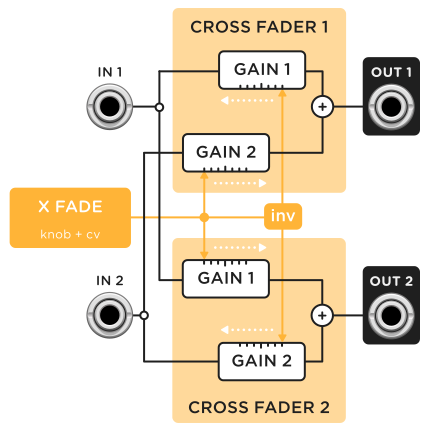
This utility balances or crossfades two audio or CV signals between one or two outputs.
The FADE knob and CV input specifies the balance between the IN 1 and IN 2 signals. When FADE is hard-left, IN 1 is sent directly to OUT 1, and IN 2 is sent to OUT 2. When FADE is hard-right, the outputs are swapped.
At intermediate positions, the signal levels are linearly crossfaded between these extremes. For example at 50%, both outputs are the average voltage of IN 1 and IN 2.
Settings
Right-click the panel to set the “Pan law” setting to -6 dB (linear, recommended for CV) or -3 dB (recommended for audio). -3 dB pan law applies a nonlinear (square root) scaling to each input gain, boosting the center FADE position by +3 dB relative to linear scaling. This produces a more natural pan when the outputs are used as a stereo L/R signal.
Starter tips
If only one output is used, the FADE parameter crossfades between two inputs, selecting them directly at the extremes.
If only one input is used, the FADE parameter specifies the balance between two outputs. If used as a stereo L/R signal, FADE adjusts the stereo pan.
Expert tips
The output voltages can be summarized by the formulas
OUT1 = IN1 * (1 - FADE) + IN2 * FADE
OUT2 = IN1 * FADE + IN2 * (1 - FADE)
where FADE is limited between 0 and 1.