Rescales voltages with gain, offset, and range limiting
2.6.4
Author: VCV
License: GPL-3.0-or-later
Last updated:
Created:
Plugin: VCV Free
VCV Rescale amplifies/attenuates, offsets, and optionally limits a CV or audio signal. This can be useful for adjusting the voltage range of a signal.
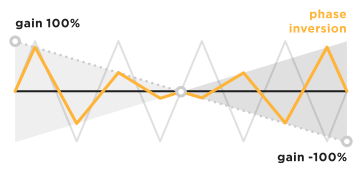
Gain is first applied to the IN signal by multiplying the voltage by a percentage. For example, a gain of 50% multiplies the signal by 0.5, halving it. A gain of 100% leaves the signal unchanged. Negative gain values invert the signal.
By default, you can apply between 1x (100%) and -1x (-100%) of gain. Right-click the panel to set the “Gain multiplier” to 1x, 10x, 100x, or 1000x for extra signal boost.
An offset voltage can be applied to the gain-processed signal. This adds a fixed voltage to the signal, between +10V and -10V.
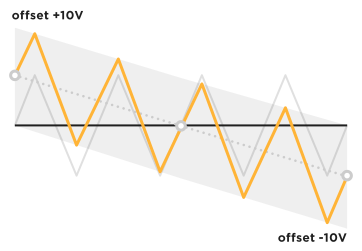
Using gain and offset, you can rescale any voltage signal range to any other, such as the following common conversions.
- 0V—10V to -5V—5V: 100% gain, -5V offset
- -5V—5V to 0V—10V: 100% gain, +5V offset
- 0V—10V to -10V—10V: 2x gain, -10V offset
- -10V—10V to 0V—10V: 50% gain, +5V offset
Range limiting
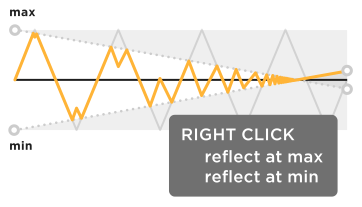
The signal is limited by the MAX and MIN knobs, initially set to 10V and -10V. The OUT signal cannot exceed these bounds, after gain and offset is applied.
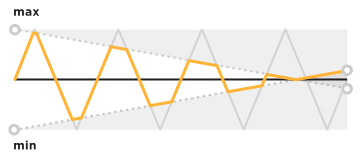
Right-click the panel and select “Reflect at maximum” and/or “Reflect at minimum” to reflect, rather than limit, the voltage to the MAX and MIN bounds. If both settings are enabled, the signal can reflect multiple times between MAX and MIN values.