

Routes one of 4 inputs to 1 output
2.6.4
Author: VCV
License: GPL-3.0-or-later
Last updated:
Created:
Plugin: VCV Free
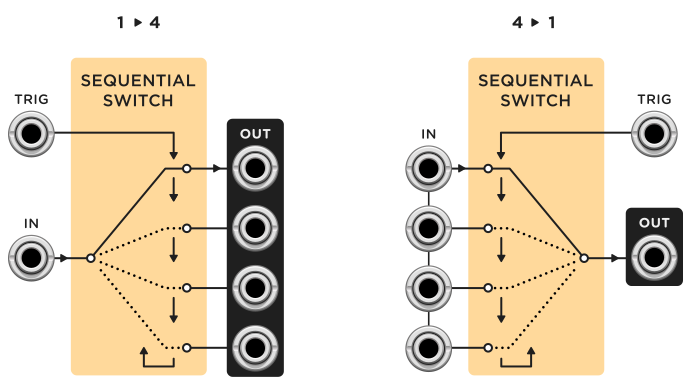
A sequential switch routes a single input to one of multiple outputs, or routes one of multiple inputs to a single output. The choice of input/output can be switched with a trigger.
VCV Sequential Switch comes in two variants: 1 input to 4 outputs, and 4 inputs to 1 outputs. You can select 2, 3, or 4 inputs/outputs with the STEPS switch. If less than 4 steps, a red light is shown next to all inaccessible inputs/outputs.
Trigger TRIG to cycle through these steps. A yellow light is shown next to the active step. Trigger RESET to reset the step to 1.
Settings
If processing audio signals, a click may occur when advancing steps. It is recommended to enable de-clicking (common on analog mixers) by right-clicking the panel and selecting “De-click”.