

Voltage-controlled wavetable oscillator
2.6.4
Author: VCV
License: GPL-3.0-or-later
Last updated:
Created:
Plugin: VCV Free
A wavetable oscillator creates periodic waveforms by playing a short audio sample every cycle. Typically several of these waveforms are loaded into memory, allowing you to interpolate between them to vary the sound. The result is a rich and lively sound source that can be used for pads, leads, bass, drones, and more.
VCV Wavetable VCO is similar to VCV VCO but with additional features for wavetable synthesis.
By default, a simple wavetable called Basic.wav is loaded, containing four waves: sine, triangle, sawtooth, and square.
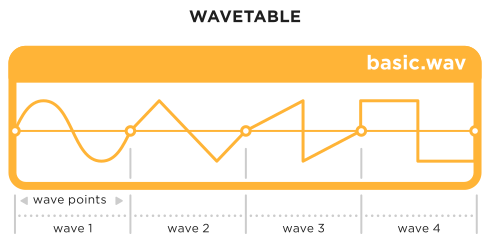
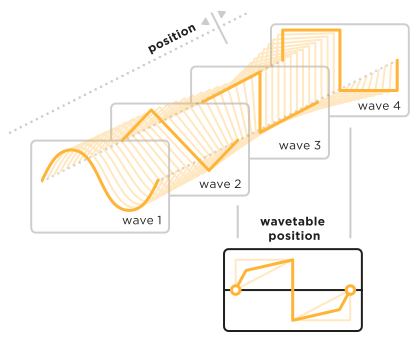
The WT POS knob changes the wavetable position, which selects the index of the wave sample in the wavetable. If the wavetable contains 4 waves for example, position 0% selects the first wave, 33.3% selects the second, 66.6% selects the third, and 100% selects the fourth. Intermediate values linearly crossfade between the two adjacent waves, so you can smoothly travel through the wavetable.
See the VCV VCO manual for details of all features shared between the two oscillators.
Loading external wavetables
You can load your own wavetables in .WAV format from any waveform editor such as WaveEdit. Right-click VCV Wavetable VCO’s panel and select “Load wavetable”. After selecting a file, select the wavetable’s number of “Wave points” in the context menu. If the waveform in the display shows 2 or more cycles, decrease the number of wave points. If half of a cycle or less is shown, increase the number of wave points.
Wavetables can contain up to 2^19 = 524,288 total samples.
.WAV files can contain 8, 16, 24, 32-bit integer, or 32-bit float samples.
Raw sample data can be loaded from the files extensions .s8, .s16, .s24, .s32, or .f32.
If the sample rate of a .WAV file is a power of 2 (such as 1024), the number of wave points is automatically set to this number.
WAV files having other sample rates (such as 48,000 Hz) must be set manually.